


DreamBoard

An Awesome Alternative To WinterBoard
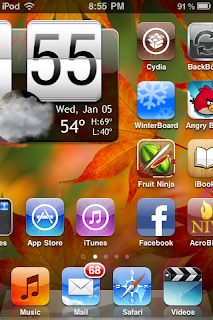
DreamBoard is a new jailbreak app that allows users to easily customize their iPhone. The app, which is currently available in the Cydia Store, is a great alternative to WinterBoard – Jay Freeman’s own theme applying jailbreak application.
DreamBoard allows users to easily apply an Android OS theme to their iDevice. This places a calendar and weather widget at the top of the Home screen, and app icons at the bottom. However, a variety of other themes can quickly be applied, too.
In order to download DreamBoard, search for it in the Cydia Store
Shrink

Resize your Springboard Icons
Using shrink you can set a specified percentage of how big you want the icons to be from their original sizes. Once you've chosen your size, simply respiring, and voila. Smaller icons! This app is also compatible with winterboard, iconoclasm, and infinidock.
Shrink is developed by phoenix3200, who has also brought us Music Controls, CalendarPro (Profiles), and Resupported. You can grab Shrink, and his other apps in the Cydia store now.
Shrink runs for $0.99PerPageHTML
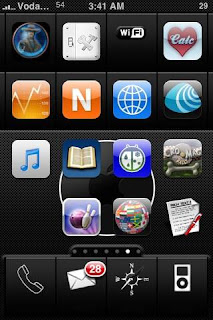
So Winterboard doesn't allow per-page wallpapers on iOS4 anymore, and this seems to be a big problem for most nav based themes. But who needs boring, static, per-page wallpapers anyways?
Instead I offer you per-page HTML wallpapers. With this, you can have dynamic, (not yet) interactive backgrounds on every page.
Things such as having a widget on each page, having a different animated background on each page or even an entire theme based off of interactive HTML widgets.
Things such as having a widget on each page, having a different animated background on each page or even an entire theme based off of interactive HTML widgets.
[Download] (Or in Cydia)
SnowCover

Snowcover is a Tweak available via Cydia which changes the way artwork is displayed on the LockScreen. It takes the big images and shrinks it onto a nice CD case/Vinyl design it also adds a beautiful background image. Double tapping the home button makes the Vinyl record slide out with iPod Controls on it from where you can easily Skip to next or previous song or Pause|Play a song. You can download SnowCover via Cydia under macciti repo & Activate it via WinterBoard.
iBlank – Easily Create Blank Icons
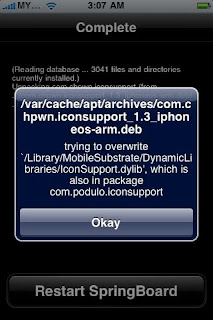
iBlank is an application that allows you to easily create blank/transparent icons. This is ideal for custom modding. I know Doug uses a blank icon under Stack on his dock. It is also nice for lining up your icons exactly how you would like them or use with certain themes. Here is how the app works.
When you open iBlank, you will get the main screen which contains instructions on how to use the application. All you need to do, if you would like to create a blank icon, is select the Create Blank Icon button at the bottom of the page. You will then get a pop-up saying that the icon has been successfully created. Select OK and then hit your Home Button. Your iPhone will respring and you will have a blank icon on your SpringBoard. If you are having trouble finding your blank icon, just make your icons wiggle (tap and hold any icon until they all start wiggling). You can then find it because you will see a space with an x in the top left corner but no icon.
The only issue I have ever had with blank icons is the inability to delete them (see THIS post). So, I was slightly concerned that I would have the same issue with the blank icons created with iBlank. However, I was able to delete the blank icons very easily by selecting the x while the icons are wiggling.
Note: The blank icons that are created are basically blank webclip icons. So, if you are curious, you can find the icons in the var/mobile/Library/WebClips folder on your iPhone or iPod Touch.
iBlank is available for free on Cydia.
But After u install Gridlock, iBlank not need!

SBSettings

SBSettings is a great new app that allows you to quickly toggle Wifi, Data, SSH, hide apps and fix permissions and other services that are normally controlled by Settings and BossTools.
Simply access the new SBSettings by installing it on your jailbroken iPhone 3G or iPhone/Ipod Touch via Cydia. Once that’s out of the way, to launch the app swipe your finger across or down, even double tap the status bar when your phone is locked or you are on the springboard and the new drop down menu will appear.
Reminds me of the G1 task manager. Easy device management. This app is free and very useful. Enjoy.
Infinifolders

Infinifolders is a jailbreak app that lets you have an unlimited number of icons in any folder. Apple by default limits you to a maximum of 12 app icons per folder. With Infinifolders you can add as many apps as you want to your folders and just swipe up and down in the folder to view them all. If you find it annoying to have 5 different games folders, that is if you have too many apps like me, the twelve max limit in iOS 4 is annoying you, & you are jailbroken, go get this app right away.
Developed by chpwn and available in Cydia (not Rock) under the search term “Infinifolders”. Infinifolders costs two dollars and is a killer must get addon jailbreak utility for iOS4 users.


Categories

Categories allows you to create folders on your iPhone, iPad, iPod Touch (springboard) desktop. This allows you to organize your desktop rather than having it be a huge mess. The app comes with a GUI configurator so that you do not have to edit text files. When you add an app to a category, it is removed from the springboard list so that it no longer shows up on the main desktop. When you remove the app from the category it is returned back to the springboard.
Works with iOS 3 and iOS 2. Does not have the 12 icons per folder limit of iOS 4 folders.
Above is an example of a categories folder full of games
Creating and Deleting Categories
To create a category, load the main GUI and select "ADD". You will be asked to type the name of the category and then select an icon. Once this is done, you will need to add programs to the category to use it. To delete a category, just tap "Edit" and then select the category to delete. Categories must be empty in order to be deleted. Therefore, you must first delete the apps out of the category before you can delete the category. Here is the categories add icons screen:

Categories is available for free on Cydia.
WeatherIcon
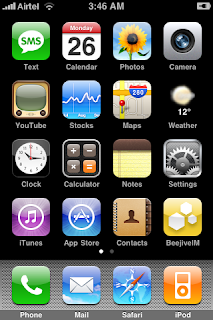
When you install the WeatherIcon app in Cydia (be sure you install version 1.1.1 or newer), it adds an option to your WinterBoard titled Weather Icon. When you select the Weather Icon option in WinterBoard, it will activate the application. When the app is activated, it changes your stock weather icon to a blank weather icon and then puts the new temp and weather image on top of the blank weather icon.
1. Find the file Library/Themes/WeatherIcon.theme/Bundles/com.apple.springboard/com.ashman. WeatherIcon.plist on your iPhone or iPod Touch.
2. Open the com.ashman.WeatherIcon.plist file. Below is what it will look like.
Code:
<?xml version="1.0" encoding="UTF-8"?>
<!DOCTYPE plist PUBLIC "-//Apple//DTD PLIST 1.0//EN" "http://www.apple.com/DTDs/PropertyList-1.0.dtd">
<plist version="1.0">
<dict>
<key>Celsius</key>
<false/>
<key>Location</key>
<string>20852</string>
</dict>
</plist>
<!DOCTYPE plist PUBLIC "-//Apple//DTD PLIST 1.0//EN" "http://www.apple.com/DTDs/PropertyList-1.0.dtd">
<plist version="1.0">
<dict>
<key>Celsius</key>
<false/>
<key>Location</key>
<string>20852</string>
</dict>
</plist>
3. Change the number 20852 to whatever your current zip code is. Below is an example of what it would look like changed.
Code:
<?xml version="1.0" encoding="UTF-8"?>
<!DOCTYPE plist PUBLIC "-//Apple//DTD PLIST 1.0//EN" "http://www.apple.com/DTDs/PropertyList-1.0.dtd">
<plist version="1.0">
<dict>
<key>Celsius</key>
<false/>
<key>Location</key>
<string>50023</string>
</dict>
</plist>
<!DOCTYPE plist PUBLIC "-//Apple//DTD PLIST 1.0//EN" "http://www.apple.com/DTDs/PropertyList-1.0.dtd">
<plist version="1.0">
<dict>
<key>Celsius</key>
<false/>
<key>Location</key>
<string>50023</string>
</dict>
</plist>
4. Close the file…it should ask you if you would like to save the change…yes, you want to save the changes.
5. Respring your springboard and you will have the current temp for your zip code on your weather icon.
WeatherIcon is available for free on Cydia.
5. Respring your springboard and you will have the current temp for your zip code on your weather icon.
WeatherIcon is available for free on Cydia.
SpringJumps

SpringJumps allows for the creation of shortcut icons that, when tapped, will "jump" to the associated SpringBoard page. This provides a quick way of navigating SpringBoard without having to endlessly swipe to find a given application.
Above is an example of one possible usage - using the first SpringBoard page to hold a collection of links to other pages:
Here is another usage - keeping a set of links in the dock to quickly jump to a SpringBoard page:


Here is the same usage example using custom titles (set with the preferences application) and icons (via saurik's WinterBoard) (the icons used are from the Tango icon-set):
Here is the same usage example using custom titles (set with the preferences application) and icons (via saurik's WinterBoard) (the icons used are from the Tango icon-set):

SpringJumps is available for free on Cydia.
Lockscreen Clock Hide

Lockscreen Clock Hide is a mod that removes the time and date from your lockscreen leaving you with just a blank lockscreen. What is cool, is that it replaces the little lock icon that is normally on your status bar when your iPhone or iPod Touch is locked with the time! So, you don’t actually completely lose the time…it just gets moved to your status bar!

Lockscreen Clock Hide is available for free on Cydia.
LiveClock

Did you ever notice the Clock icon is always pointing to 10:15? It’s static and never changes. Developer, Ryan Petrich, has developed a fun hack called LiveClock to bring an animated clock icon to iPhone. By installing LiveClock, the Clock icon will always show the current time with second hand moving continuously.
Earlier version of LiveClock requires you to have Winterboard installed. However, the latest version (i.e. 0.3) has removed this limitation. As long as you have a jailbroken iPhone, you can install this hack from Cydia.
LiveClock is available for free on Cydia.
Gridlock

Chpwn and p0sixninja has developed a new app ‘Gridlock’ for iPhone, iPod and iPad which allow you to reposition springboard icons freely! You can move the icons in every possible way in the 4×4 layout throughout the Springboard, even allowing you to leave empty space.
With Gridlock Cydia app you can arrange your springboard icons in order of how frequently they are being used or assigning rows to a particular category of apps on Jailbroken iDevice. Gridlock Cydia app will cost $ 1 and be added to Cydia Store .
Gridlockis available on Cydia.
Folder Enhancer

This app help u create Sub Folders On Jailbroken iOS 4.x iPod iPad iPhone
A awesome jailbreak app that let’s you considerably improve what you can do with Folders on your iPhone. At the time though, the app was still being worked on. I’m here to tell you FolderEnhancer is now available on Cydia.
iOS 4 gave us the ability to create folders on the home screen. This was in itself a big step forward but its implementation is limited. FolderEnhancer unleashes the potential of your iPhone folders with some amazing features…
I’ve been playing with FolderEnhancer for a while and it doesn’t only look good, it works great too, except for that one time when it crashed my iPhone. I guess it just needed a reboot… So, what does FolderEnhancer do?
1. It definitely opens folders faster
2. You can add up to 320 icons per folder (by default, Apple limits you to 12/folder)
3. You can create folders inside folders
4. You can add folders to the dock
Additionally, FolderEnhancer comes with a few options you can tweak in the settings.app, such as disabling the folder wallpaper, hiding the folder name, or disabling animations.
FolderEnhancer is compatible with MultiIconMover and Iconoclasm.
Is this app worth the $1.99 price tag? Absolutely. Now stop reading this and go download it in Cydia. You won’t regret it. If you have already downloaded FolderEnhancer, please take the time to tell us what you think.
Folder Enhancer is available on Cydia.
Iconoclasm

Iconoclasm has been on the Cydia Store for around a few months now and I think it is a great way to mod your iPhone/iPod Touch. Basically what it lets you do is change how many icons you can have on one springboard page, a little like FCSB, FiveIRows and other springboard hacks. Iconoclasm however, is a little different to the others in which it lets you break away from the normal columns and rows on a springboard page and have icons in a place in which you like.
When I first bought Iconoclasm from reading the description in Cydia, I thought it would automatically let you place the icons wherever you please just by using the normal ‘wiggle mode’ but this isn’t the case. The layouts need to be made using a plist file which tells Iconoclasm where to let the icons be placed on the springboard. There are many layouts available for download in Cydia, many of which are made by myself. If you are a little bit more advanced you can of course make the layouts yourself. Another great advantage of Iconoclasm is with the setup of themes like the iNav theme, instead of having to use masses of blank icons you can just drag the normal icons straight into place. There are also a few of these types of layouts in Cydia.
Now, how to use Iconoclasm. You will find a setting pane for Iconoclasm in the stock Settings application on your iPhone/iPod Touch. Once in this settings pane you will find a variety of options. The first is if you want Iconoclasm to be enabled or not. The next option if under a ‘Uniform Layout’ header. This lets you choose a layout to use and this option will change every springboard layout to the layout of choice. But underneath is a pretty cool option to use, Per-Page Layouts. If you turn this on it lets you use a different layout for each springboard page. This is cool if you, for example, want to spell you name with icons. I have created all of the letters of the alphabet so this is a option. Once you have picked your selection, scroll to the very bottom of the page and tap the ‘Apply Changes & Respring’ button. This will do what it says, apply the layout changes and respring your iPhone. Once finished your springboard will be using the layouts set.
Overall I think this app is well worth the $3.00 (around £1.80 if you live in the UK like me). There are a few screenshots below of some of the layouts currently available.


Iconoclasm is available for free on Cydia.
Iconoclasm is available for free on Cydia.